
Last updated: 2026-04-25
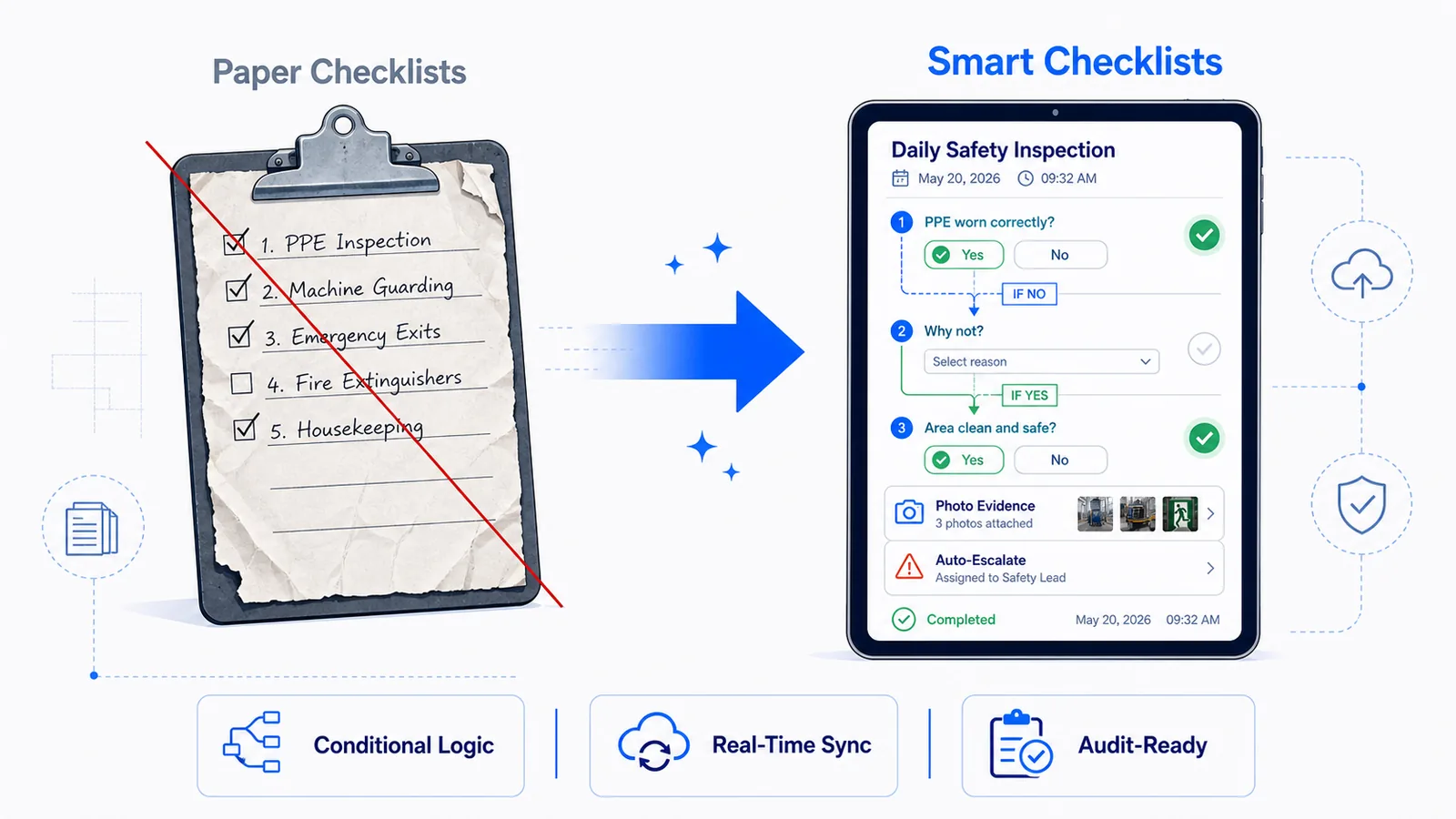
Smart safety checklists are digital, adaptive inspection tools that replace paper and spreadsheets with conditional logic, real-time validation, automatic audit trails, and integration with hazard detection systems. They reduce missed steps, support compliance workflows at the point of inspection, and generate structured documentation without manual data entry.
Introduction: The Hidden Cost of Paper Checklists
Paper checklists have been the backbone of industrial safety for decades. Walk onto any manufacturing floor, construction site, or processing plant, and you'll likely find a clipboard hanging near the supervisor's desk — coffee-stained, half-filled, with handwriting that ranges from meticulous to illegible.
There's a reason the practice persists: it's familiar, requires no training, and costs almost nothing to start. But the hidden costs accumulate quickly.
A safety officer at a mid-sized manufacturing facility spends an estimated 4-6 hours per week transcribing, filing, and chasing down incomplete paper checklists (anonymized deployment data). That's 20-30 hours per month — nearly a full work week — spent on administrative work that produces no direct safety improvement. Meanwhile, incomplete checklists, missed signatures, and lost documentation create gaps that auditors notice immediately and that expose the organization to compliance risk.
Spreadsheets were supposed to solve this. And in some ways, they did: digital storage, easier search, and no coffee stains. But spreadsheets are not inspection tools. They don't guide the inspector. They don't enforce completion. They don't adapt when a hazard is found. They're just digital paper.
This guide explains what smart safety checklists are, why they matter, and how modern safety teams are using them to transform inspections from a documentation burden into a genuine risk-reduction tool.
Ready to move beyond paper? SAFVR's ACT module automates safety workflows, alerts, and compliance actions — turning every checklist response into an accountable, trackable action.
What Are Smart Safety Checklists?
Smart safety checklists are digital inspection tools designed to guide, validate, and adapt based on what the inspector finds in the field. Unlike static paper forms or rigid spreadsheet templates, digital safety checklists use conditional logic, real-time data validation, and integration with broader safety systems to ensure inspections are thorough, consistent, and automatically documented.
The core difference is adaptivity. A paper checklist presents the same 40 items every time, regardless of whether the inspector is evaluating a welding station or a chemical storage area. A smart checklist asks different follow-up questions based on the area, the shift, the weather, or the answers to previous questions. It hides irrelevant items, surfaces critical ones, and escalates automatically when a hazard is identified.
Key Capabilities
| Capability | Paper / Spreadsheet | Smart Safety Checklist |
|---|---|---|
| Conditional logic | None | Dynamic paths based on answers |
| Required fields | Cannot enforce | Enforces completion before submission |
| Photo attachment | Physical camera, manual filing | Built-in, geotagged, auto-attached |
| Real-time alerts | Delayed (if at all) | Instant notification to supervisors |
| Audit trail | Manual signatures, easy to lose | Timestamped, immutable, exportable |
| Offline access | Always available | Available with sync-on-reconnect |
| Integration with detection | None | Links to AI hazard detection and action workflows |
| Analytics | Manual tabulation | Automatic dashboards and trend reports |
(Table based on anonymized deployment data and product capabilities)
Smart safety checklists are not simply digital copies of paper forms. They are inspection tools designed to make the inspector more effective and the documentation process invisible.
The Problems with Paper and Spreadsheet Checklists
Moving away from paper is not about chasing technology for its own sake. It's about solving specific, measurable problems that safety officers encounter every day.
1. Illegible and Incomplete Entries
Handwriting varies. Fields get skipped when the inspector is in a hurry. On paper, there's no way to enforce that a field is filled before the checklist is considered complete. In one anonymized deployment review, 23% of paper checklists had at least one critical field left blank.
2. No Real-Time Validation
A paper checklist cannot tell you that the permit number you wrote down expired yesterday. A spreadsheet won't flag that the temperature reading you entered is outside the safe operating range. Validation happens hours or days later — if someone reviews the form at all.
3. Lost and Damaged Documentation
Paper checklists get left in trucks, soaked in rain, or filed in the wrong binder. When an auditor asks for proof that monthly inspections occurred, the safety officer spends hours searching. In customer-reported feedback, finding historical checklist records was consistently cited as one of the most time-consuming compliance tasks.
4. Delayed Escalation
When a hazard is found on paper, the process is: finish the inspection, walk back to the office, fill out a separate report, email the supervisor, wait for a response. That delay — often hours — is time when the hazard remains unaddressed. Smart checklists with safety inspection automation trigger alerts the moment a critical response is recorded.
5. Zero Analytics Without Manual Work
Want to know how many times a particular machine failed inspection in the last quarter? With paper, that's a manual count. With spreadsheets, it's a filter-and-pivot exercise that assumes the data was entered consistently. Neither approach surfaces trends that could predict failures before they happen.
6. The "We've Always Done It on Paper" Trap
This is the most common objection safety officers hear when proposing a change. The argument usually goes: paper is reliable, it doesn't need batteries, and workers already know how to use it.
All of this is true — at the surface level. But the unstated costs are substantial: the transcription time, the filing errors, the delayed responses, and the compliance gaps that show up in audits. Paper feels free because the costs are distributed across dozens of small inefficiencies that no one tracks. When organizations switch to mobile safety checklists, the administrative time savings alone often justify the investment within the first quarter (pilot benchmark data).
8 Features of Modern Smart Checklists
Not all digital checklists are "smart." A PDF form on a tablet is still a static checklist. The following features separate modern smart checklists from basic digital replicas:
1. Conditional Logic and Branching
The checklist adapts based on answers. If the inspector marks "hazard detected," the form automatically presents follow-up questions about severity, photo requirements, and immediate actions. If the area being inspected doesn't contain hazardous materials, those questions are hidden entirely.
2. Required Field Enforcement
Critical fields cannot be skipped. The checklist won't allow submission until every mandatory item is completed, photographed, or signed off. This eliminates the "I'll fill it in later" problem.
3. Offline-First Mobile Design
Industrial sites often have poor connectivity. Mobile safety checklists work without a connection and sync automatically when the device reconnects. Inspectors can work anywhere without worrying about losing data.
4. Photo, Video, and Audio Capture
Built-in media capture attaches visual evidence directly to checklist items. Photos are geotagged and timestamped automatically, creating a clear record of what was found and where.
5. Real-Time Alerts and Escalation
When a critical response is recorded, supervisors receive instant notifications via SMS, email, or in-app alert. This is one of the defining advantages of modern safety checklist software over static forms. High-priority findings trigger automated workflows — assigning corrective actions, scheduling follow-up inspections, or locking down equipment until resolution.
When a critical response is recorded, supervisors receive instant notifications via SMS, email, or in-app alert. High-priority findings trigger automated workflows — assigning corrective actions, scheduling follow-up inspections, or locking down equipment until resolution.
6. Pre-Built and Customizable Templates
Modern platforms include templates for common inspections (pre-start checks, lockout/tagout, confined space entry) while allowing organizations to build site-specific templates that reflect their actual risks and procedures.
7. Automatic Audit Trail Generation
Every action is logged: who completed the checklist, when, where, and what responses were recorded. Edits are tracked with before-and-after values. This creates a structured review record without additional administrative work.
8. Analytics Dashboards and Trend Reporting
Inspection data feeds automatically into dashboards that show completion rates, recurring failure points, inspector performance, and risk trends over time. Safety officers can spot patterns — like a machine that fails inspection every third shift — that would be invisible in paper records. This analytical capability is what separates true safety checklist software from basic digital forms.
Inspection data feeds automatically into dashboards that show completion rates, recurring failure points, inspector performance, and risk trends over time. Safety officers can spot patterns — like a machine that fails inspection every third shift — that would be invisible in paper records.
Conditional Logic: Checklists That Adapt
The most powerful feature of smart safety checklists is conditional logic — the ability to change what the inspector sees based on their answers.
Here's how it works in practice:
Scenario: A plant manager is conducting a daily pre-operational inspection on a production line.
-
Question 1: Is the area clear of obstructions?
- If "Yes" → proceed to Question 2.
- If "No" → the checklist branches to: photograph the obstruction, describe the hazard, select severity level, and trigger an alert to the shift supervisor. The remaining routine questions are paused until the obstruction is cleared and re-verified.
-
Question 5: Are hazardous materials present in this area today?
- If "Yes" → present PPE verification questions, exposure monitoring checks, and spill kit confirmation.
- If "No" → skip all chemical safety questions entirely, saving time and reducing cognitive load.
This branching approach means inspectors spend time only on what's relevant. It also prevents the common problem of "checkbox fatigue" — where workers rush through a long, generic form and check "OK" on items that don't even apply to the current situation.
Conditional logic also enables dynamic risk scoring. As the inspector answers questions, the system calculates a real-time risk score. If the score exceeds a threshold, the checklist automatically escalates — requiring a supervisor sign-off, initiating a safety hold, or creating a corrective action in the ACT workflow system.
Integration with Detection and Action Workflows
Smart checklists don't exist in isolation. Their full value emerges when they connect to broader safety intelligence systems — particularly hazard detection and automated response workflows.
SAFVR's AURA (Autonomous Unified Recognition & Action) Engine — an adaptive safety intelligence platform — runs a continuous loop: DETECT → ACT → IMPROVE → PREVENT. Smart checklists sit at the center of this loop, serving as both an input source and an action trigger.
How Integration Works
-
Detection feeds the checklist: When AURA's computer vision system detects a hazard through existing IP cameras — a missing hard hat, an unauthorized entry, a spill — it can automatically generate a targeted checklist for the area. The inspector arrives with a form already pre-populated with the specific issue to verify.
-
Checklist responses trigger actions: When an inspector records a critical finding, the automated safety checklist initiates the next step — assigning a task, notifying a supervisor, scheduling maintenance, or documenting the incident for training.
-
Data flows into improvement and prevention: Inspection results feed into trend analysis that identifies leading indicators. If a particular checklist item fails repeatedly on night shifts, the system flags it as a predictive risk pattern and triggers site-specific micro-training before the next incident occurs.
This closed-loop approach transforms checklists from passive documentation into active safety controls. The checklist is no longer just a record of what was found — it's a trigger for what happens next.
Audit Trails and Compliance Documentation
One of the most immediate benefits of digital safety checklists is automatic, audit-ready documentation.
Every smart checklist generates a complete record that includes:
| Record Element | What's Captured |
|---|---|
| Inspector identity | Who completed the checklist (login-verified) |
| Timestamps | Start time, completion time, and duration |
| Location | GPS coordinates or tagged area/zone |
| Responses | Every answer, with before/after edit history |
| Media | Attached photos, videos, and audio notes |
| Escalations | Alerts sent, tasks created, and responses received |
| Signatures | Digital sign-off with timestamp verification |
| Template version | Which version of the checklist was used |
(Based on SAFVR platform capabilities)
This level of documentation is designed to support compliance with OSHA recordkeeping requirements, ISO 45001 standards, and internal audit protocols. Auditors receive complete, timestamped, tamper-evident records — not binders of paper that may be incomplete or illegible.
For organizations preparing risk reviews or safety certification audits, this documentation provides leading-indicator reports that stakeholders can evaluate (customer-reported).
Measuring Checklist Effectiveness
Implementing smart checklists is an investment. Safety leaders need to know whether that investment is delivering results. The following metrics provide a clear picture:
| Metric | What It Measures | Target Benchmark |
|---|---|---|
| Inspection completion rate | % of scheduled inspections completed on time | >95% (pilot benchmark) |
| Average inspection time | Time from start to submission | 15-30% reduction vs. paper (anonymized deployment) |
| Critical finding response time | Time from hazard recording to action assignment | <5 minutes (with automated alerts) |
| Checklist compliance score | % of required fields completed without override | >98% (with enforced fields) |
| Repeat failure rate | How often the same item fails consecutive inspections | Trending downward (leading indicator) |
| Administrative time saved | Hours per week not spent on transcription/filing | 4-6 hours/week per safety officer (anonymized deployment) |
| Audit finding reduction | Compliance gaps identified during external audits | 40-60% reduction year-over-year (customer-reported) |
The most important metric is often the simplest: are inspections actually happening on schedule? Paper systems create the illusion of compliance because the binder looks full. Smart checklists show the truth — completion rates, overdue inspections, and missed areas — in real time.
Frequently Asked Questions
What is the difference between a digital checklist and a smart safety checklist?
A digital checklist is a static form — often a PDF or basic app — that replaces paper but doesn't add functionality. A smart safety checklist uses conditional logic, real-time validation, automatic escalation, and integration with safety systems to actively guide the inspector and trigger follow-up actions.
Can smart checklists work offline in areas with no cell service?
Yes. Modern mobile safety checklists are designed to work offline and sync when connectivity returns. Inspections conducted in basements, remote facilities, or areas with poor coverage are saved locally and uploaded automatically.
How difficult is it to switch from paper checklists to a digital system?
The transition is typically straightforward. Most organizations start by converting their existing paper forms into digital templates — which takes a few hours, not weeks. The larger change is cultural: training inspectors to use tablets or phones. In practice, this adoption happens quickly because the interface is simpler than paper (pilot benchmark data).
Do smart checklists integrate with existing EHS software?
Most modern platforms offer API integrations or direct connections to common EHS systems. More importantly, smart checklists within an integrated Safety Intelligence Platform connect directly to hazard detection, action workflows, and training systems — creating a closed loop that standalone EHS software cannot replicate.
What happens when an inspector finds a serious hazard during a checklist?
The system immediately triggers an alert to designated supervisors and can automatically create a corrective action task, schedule a follow-up inspection, or initiate a safety hold. All of this happens without the inspector needing to leave the area or fill out additional forms. Learn more about safety compliance automation.
Conclusion
Paper checklists served the safety industry well for a century. They are simple, familiar, and require no technology. But they also create hidden costs — transcription time, lost documentation, delayed escalation, and compliance gaps — that compound with every inspection.
Smart safety checklists solve these problems not by adding complexity, but by making the inspection process adaptive, validated, and connected. They reduce missed steps. They enforce completion. They turn findings into actions automatically. And they generate the audit-ready documentation that modern compliance demands.
For safety officers and plant managers who have spent years managing paper binders, the shift can feel uncertain. The "we've always done it this way" objection is understandable. But the organizations that have made the switch consistently report the same outcome: inspections are faster, documentation is complete, and safety officers spend less time on administration and more time on the floor where they belong.
If your team is ready to move beyond paper and spreadsheets, the fastest way to evaluate smart checklists in your environment is through a hands-on pilot.
Start your 30-day safety intelligence pilot →
Related Reading
- Safety Compliance Automation Guide — How AI automates the entire compliance workflow — from detection to documentation to audit readiness.
- Safety Intelligence Pilot ROI Methodology — Measure the ROI of replacing paper checklists with digital inspection tools during a 30-day pilot.
- What Is a Safety Intelligence Platform? — Smart checklists are one component — see how they fit into the full safety intelligence ecosystem.