
Last updated: 2026-04-25
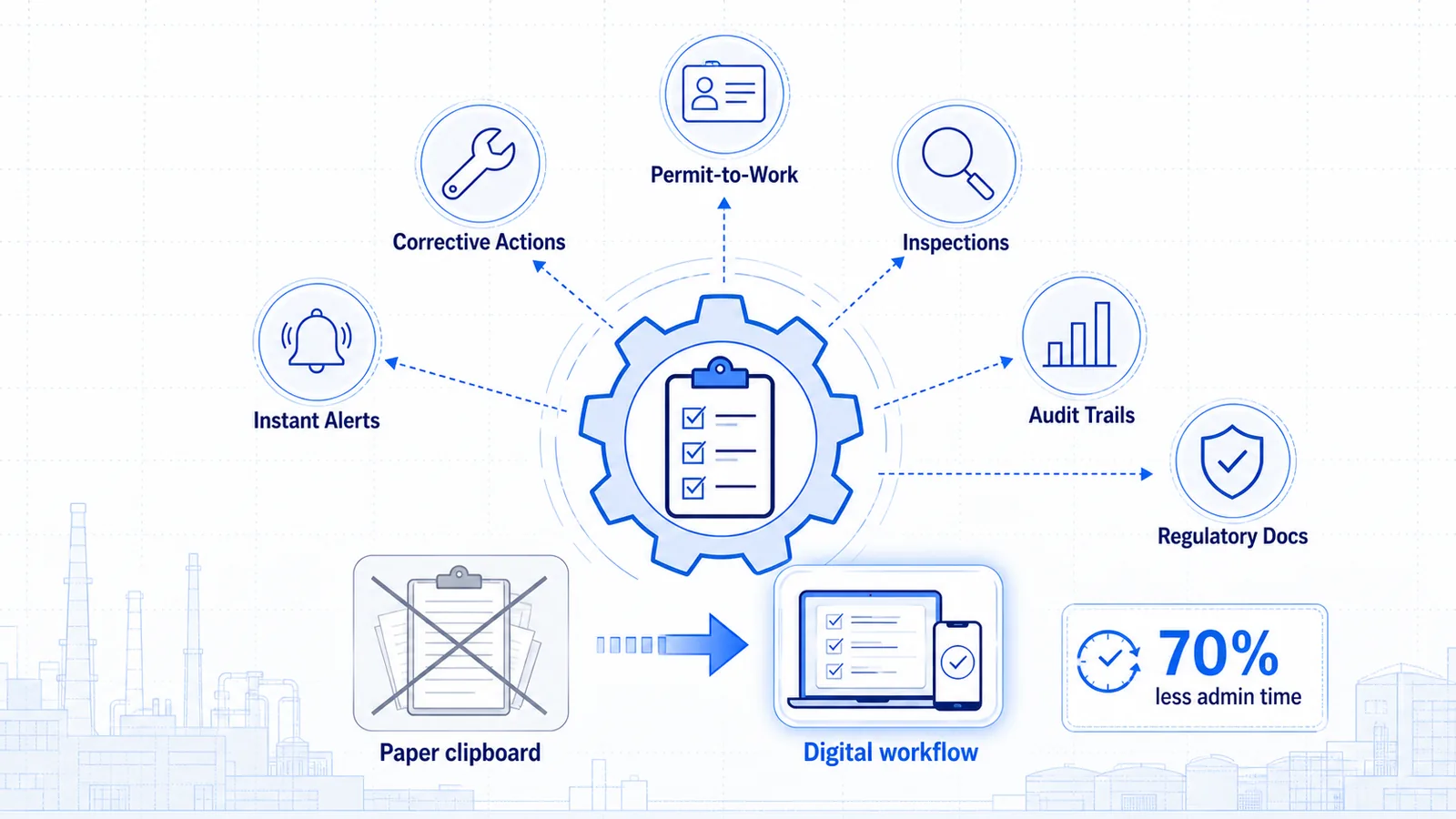
Answer in brief: Safety compliance automation replaces paper checklists and manual follow-ups with intelligent workflows that detect hazards, assign corrective actions, track permit-to-work status, and generate audit trails automatically. Platforms like SAFVR's AURA (Autonomous Unified Recognition & Action) Engine — an adaptive safety intelligence platform — use live site intelligence to close the loop between detection, action, and prevention — cutting administrative burden by up to 70% while improving accountability. (Source: anonymized deployment data)
Introduction: The Cost of Compliance Gaps
Every EHS manager knows the dread of an unannounced audit. Folders of half-completed checklists. Permit-to-work tickets stuck in someone's inbox. Near-miss reports that were filed but never followed up. These aren't just administrative headaches — they're liability exposure.
The National Safety Council estimates that workplace injuries cost U.S. employers over $167 billion annually in direct and indirect costs (third-party statistic). Yet much of that risk is preventable — not by hiring more safety officers, but by removing the friction that causes compliance tasks to slip through the cracks.
Manual safety compliance processes create three predictable failure modes:
- Delay: The average corrective action in a paper-based system takes 14–21 days to close (illustrative example). By then, the hazard has either caused an incident or become "invisible" through familiarity.
- Inconsistency: Different shifts interpret checklists differently. What qualifies as "resolved" on Day Shift may not pass muster on Night Shift.
- Invisibility: Without a digital trail, leadership sees individual incidents, not the systemic issues that produce them.
Safety compliance automation embeds accountability into workflow design. When a hazard is detected, the system creates the action item, assigns an owner, sets a deadline, and escalates automatically. This guide covers what it delivers, which workflows produce the fastest ROI, and how SAFVR integrates without a rip-and-replace deployment.
What Is Safety Compliance Automation?
Safety compliance automation is the use of software-driven workflows to execute, track, and document the repetitive tasks required to maintain regulatory and internal safety standards. It spans everything from automated permit approvals and digital inspections to real-time hazard alerts and corrective action tracking.
Importantly, it is not about replacing safety professionals. It is about removing the administrative tax that keeps safety teams from improving conditions and protecting workers.
The Scope of Modern Safety Compliance Automation
| Capability | What It Replaces | Outcome |
|---|---|---|
| Digital inspections & checklists | Paper clipboards, Excel trackers | Standardized data, no lost forms |
| Automated hazard alerts | Supervisor radio calls, word of mouth | Instant notification with photo/video evidence |
| Permit-to-work digitization | Physical permit boards, email chains | Real-time status, lockout integration |
| Corrective action tracking | Spreadsheets, memory-dependent follow-up | Closed-loop accountability with SLA enforcement |
| Audit trail generation | Manual file compilation, weeks of prep | One-click export with timestamps and signatures |
| Predictive risk surfacing | Reactive incident analysis | Leading indicators from correlated data |
At SAFVR, safety compliance automation lives in the ACT phase of the AURA Engine. When AURA's DETECT layer identifies an unsafe act or condition via existing IP cameras, the ACT layer triggers the appropriate workflow: alert the supervisor, create the work order, schedule the re-inspection, and log everything to a searchable compliance record. Learn more about automated safety actions →
6 Workflows You Can Automate Today
The following six workflows have been validated across manufacturing, warehousing, energy, and heavy industrial deployments. Each includes a before/after comparison.
1. Hazard Detection & Real-Time Alerting
Before: A worker removes their hard hat in a designated zone. No one sees it. If a supervisor walks by 20 minutes later, they might issue a verbal warning — or get distracted and forget.
After: Existing IP cameras feed into a Safety Intelligence Platform. The system detects the missing PPE in seconds, sends an alert to the floor supervisor's mobile device with a timestamp and image, and logs the event. If the condition persists, it escalates to the EHS manager.
2. Daily Safety Inspections & Checklists
Before: A shift lead carries a clipboard, ticks boxes, and drops the form in a bin. Someone scans it next week. Critical findings enter a black hole of manual follow-up.
After: Digital checklists enforce completion logic (e.g., "You cannot submit until the fire extinguisher photo is attached"). Findings auto-generate corrective actions. Completion rates are visible in real time across all shifts and sites.
3. Incident Reporting & Investigation
Before: An employee fills out a paper incident report, hands it to their supervisor, who hands it to the EHS coordinator, who enters it into a spreadsheet "when they get to it." Investigation assignments happen via email threads with unclear ownership.
After: Anyone with permissions submits a digital report in under two minutes. The system routes it to the investigator based on incident type and severity. Root cause templates guide consistent documentation. The entire file is exportable for insurance or regulatory review.
4. Permit-to-Work Management
Before: A maintenance crew fills out a paper hot-work permit, walks it to the control room, waits for the permit issuer, posts it on a physical board, and begins work. If conditions change mid-job, updating the permit requires another round of paper shuffling.
After: The requester submits a digital permit from a tablet. The system checks prerequisites (gas testing, isolation confirmation) before allowing approval. Approved permits display on a live digital board. Status changes propagate instantly. (See deep dive below.)
5. Corrective Action Tracking
Before: An audit identifies 47 findings. The EHS team puts them in a shared spreadsheet. Three months later, 12 are still open, 8 were "closed" with no evidence, and no one can explain who owned #23.
After: Each finding auto-generates a ticket with owner, due date, and required evidence. Overdue items trigger escalation. Closure requires verified evidence upload. Dashboards show open/closed rates by department and severity.
6. Compliance Calendar & Training Scheduling
Before: Certification expirations live in a spreadsheet. Someone has to remember to check it. When a forklift operator's certification lapses, they're either benched unexpectedly or — worse — allowed to keep working.
After: The system monitors certification dates and triggers re-training workflows 30 days before expiration. Site-specific micro-training modules auto-assign based on the worker's role and recent incidents at their facility. Learn more about incident-based micro-training →
Ready to see automation in action? SAFVR offers a 30-day safety intelligence pilot with full workflow automation configured for your site. No hardware changes required — we work with your existing camera infrastructure.
OSHA Compliance & AI: What You Need to Know
No software platform can guarantee OSHA compliance. What AI-powered safety compliance automation can do is significantly reduce the human-error factors that lead to violations and citations.
What Automation Actually Covers
OSHA's General Duty Clause requires employers to maintain a workplace "free from recognized hazards." Proving that you identified, tracked, and remediated hazards is where automation delivers its compliance value:
- Timely detection: Computer vision identifies hazards in real time, creating a timestamped record that you acted promptly.
- Documented response: Every alert generates an auditable action trail — who was notified, when, and what they did.
- Consistent inspection cadence: Digital checklists enforce completion schedules so missed inspections don't become regulatory gaps.
The "Designed to Support" Principle
SAFVR's AURA Engine is designed to support OSHA compliance by automating documentation, standardizing workflows, and surfacing leading indicators. It does not replace OSHA-required competent persons, certified audits, or legal counsel.
| OSHA Challenge | Manual Approach Risk | Automated Approach Advantage |
|---|---|---|
| Hazard abatement timelines | Delayed or forgotten follow-up | SLA-driven escalation with auto-reminders |
| Recordkeeping (OSHA 300/300A) | Incomplete or inconsistent logs | Structured data export, pre-formatted reports |
| Inspection preparedness | Scrambling to compile files | Continuous audit-readiness, one-click export |
| Training documentation | Paper certificates, missing sign-in sheets | Digital completion records with timestamps |
Permit-to-Work Automation
Permit-to-work (PTW) systems are among the most paper-heavy, time-sensitive workflows in industrial safety. A delayed permit costs production. A sloppy permit costs lives. Automating this workflow delivers both speed and rigor.
The Manual PTW Problem
In a typical facility, a hot-work or confined-space permit passes through multiple hands: the requester, the gas tester, the permit issuer, the fire watch, and the area authority. Each handoff is a potential delay or failure point. Physical permit boards only show status to whoever is standing in front of them. If conditions change mid-permit, updating everyone requires a chain of phone calls.
The Automated PTW Workflow
SAFVR's safety compliance automation digitizes the entire permit lifecycle:
- Request: The worker submits a digital PTW request from a tablet. The system pre-populates fields based on job type and location.
- Prerequisite check: Before approval, the system verifies prerequisites are complete — gas testing within limits, isolations confirmed, PPE acknowledged.
- Approval routing: The request routes to the correct permit issuer based on type and jurisdiction. If unavailable, escalation rules reroute automatically.
- Live permit board: All active permits display on a digital dashboard visible to control room operators, shift supervisors, and EHS staff.
- Mid-job changes: If monitoring detects changing conditions (e.g., gas levels rise), the system alerts the permit holder and can trigger suspension.
- Closeout & archive: Upon completion, the worker signs off digitally, the issuer confirms, and the record archives automatically.
An automated PTW workflow proves that your facility controls hazardous work through active checks — not just paper signatures. Explore how ACT automates safety workflows →
Audit-Ready Documentation
The most painful part of any safety audit isn't the findings — it's the preparation. EHS teams routinely spend 40–80 hours compiling documentation for a single regulatory or insurance audit (illustrative example). Automation collapses that to minutes.
How Automation Creates Traceability
Every action in an automated system carries metadata: who did it, when, from what device, and in what context. That metadata becomes your audit trail.
| Audit Requirement | Automated System Output |
|---|---|
| Proof of inspections | Timestamped, geo-tagged checklist completions with photos |
| Hazard abatement records | Linked detection → action → verification chains |
| Training records | Individual completion logs with module names and scores |
| Permit history | Full lifecycle records with approver signatures |
| Incident investigations | Structured reports with root cause and closure evidence |
| Management review inputs | Dashboard exports of KPIs, trends, and open items |
Insurance underwriters increasingly evaluate leading indicators: near-miss reporting rates, corrective action closure times, inspection completion percentages, and hazard recurrence rates. Automated platforms generate these continuously. (Source: pilot benchmark data)
Integration with Existing EHS Systems
A common concern from IT and operations leaders is whether a new safety platform requires ripping out current investments. With modern Safety Intelligence Platforms, it does not.
Camera Infrastructure
SAFVR's DETECT layer works with existing IP cameras — no specialized hardware, no wearable devices. The platform ingests video streams through edge computing nodes on your network, dramatically reducing deployment time and capital expense.
EHS Software & ERP Connectivity
Most enterprises already run an EHS management system (Enablon, Intelex, Cority) or maintain data in an ERP. Modern automation platforms connect via API to:
- Push incident data into your central EHS system of record
- Pull employee and training records for assignment logic
- Synchronize asset and location hierarchies for accurate routing
- Trigger workflows in platforms like ServiceNow or SAP
IT & Security Considerations
For IT and security teams evaluating EHS compliance software, the key concerns are deployment model, data residency, and access control:
- Deployment: Edge-based processing keeps sensitive video data on-premise. Only metadata and alerts transmit to the cloud.
- Data residency: Configurable to keep all data within your geographic region.
- Access control: Role-based permissions map to your existing identity provider (Azure AD, Okta, etc.).
Integration is typically completed within 1–2 weeks for standard environments, with no disruption to production systems. See the full platform architecture →
Measuring Compliance Automation ROI
Safety investments compete with production budgets. To justify automation, EHS leaders need quantifiable outcomes. The following metrics framework separates soft benefits from hard savings.
| Metric | Before Automation | After Automation (Typical Range) | Source Type |
|---|---|---|---|
| Corrective action closure time | 14–21 days | 3–7 days | Anonymized deployment data |
| Inspection completion rate | 60–75% | 95–99% | Pilot benchmark data |
| Audit preparation time | 40–80 hours | 2–4 hours | Illustrative example |
| Permit turnaround time | 2–6 hours | 15–45 minutes | Anonymized deployment data |
| Near-miss reporting rate | Low (fear/friction) | 3–5x increase | Pilot benchmark data |
| Admin hours per EHS staff/week | 15–20 hours | 5–8 hours | Illustrative example |
| Recurring hazard detection | Reactive only | 40–60% reduction in repeats | Anonymized deployment data |
The Hidden ROI: Risk Transfer
Facilities with documented, automated compliance programs can enter risk and insurance reviews with stronger evidence. The ability to demonstrate continuous control — not just periodic compliance — is useful risk-review context. Outcomes depend on each insurer, policy, and loss history. (Source: illustrative risk-management context)
Frequently Asked Questions
What is safety compliance automation?
Safety compliance automation is the use of software workflows to execute, track, and document the repetitive tasks required for regulatory and internal safety compliance — including inspections, permit-to-work processes, hazard alerts, corrective action tracking, and audit documentation. It reduces administrative burden while improving accountability and consistency.
Can AI-powered safety software guarantee OSHA compliance?
No software can guarantee OSHA compliance. AI-powered EHS compliance software is designed to support OSHA compliance by automating documentation, standardizing workflows, and surfacing hazards faster than manual processes. Regulatory compliance still requires competent persons, proper training, and legal oversight.
How long does it take to implement automated safety workflows?
For most industrial facilities, core workflows (digital inspections, hazard alerts, corrective action tracking) can be configured within 1–2 weeks. Permit-to-work automation and ERP integration typically add 1–3 weeks depending on system complexity. SAFVR's pilot program includes full workflow configuration for your site.
Will this work with our existing cameras and EHS systems?
Yes. SAFVR works with existing IP cameras — no rip-and-replace required. The platform also integrates via API with major EHS software and ERP systems to synchronize data without disrupting your current infrastructure.
What is the ROI of safety compliance automation?
Most facilities see a 50–70% reduction in corrective action closure time and a 60–80% reduction in audit preparation time within the first 90 days. Exact ROI depends on facility size, current process maturity, and integration scope. Start a 30-day pilot to benchmark your specific ROI →
Conclusion
Paper checklists, email follow-ups, and physical permit boards create delay, inconsistency, and invisibility — the three conditions under which preventable incidents thrive.
Safety compliance automation replaces that friction with intelligent workflows: real-time hazard detection, digital permit-to-work systems, automated corrective action tracking, and one-click audit readiness. The technology is mature. The integrations are proven. And for most facilities, the ROI is measurable within the first quarter.
SAFVR's AURA Engine was built for industrial operators who need more than a digital checklist. AURA closes the loop between detection, action, improvement, and prevention — with site-specific calibration that adapts to your facility's risks, layout, and conditions.
Start Your 30-Day Safety Intelligence Pilot
See how safety compliance automation works on your floor — with your cameras, your workflows, and your team. No hardware changes. No long-term commitment.
Request Your Free 30-Day Pilot →
Or explore the full SAFVR platform to learn how AURA delivers site-specific safety intelligence across detect, act, improve, and prevent.
Related Reading
- Smart Safety Checklists Guide — How digital checklists with conditional logic and photo evidence replace paper-based inspection workflows.
- How to Evaluate a Safety Intelligence Platform — Compliance readiness is one of ten capabilities in our buyer’s scorecard — see the full evaluation framework.
- Safety Intelligence Platform Buyer’s Checklist — How to verify workflow, reporting, deployment, and compliance-support claims without relying on vendor rankings.