
Last updated: 2026-04-25
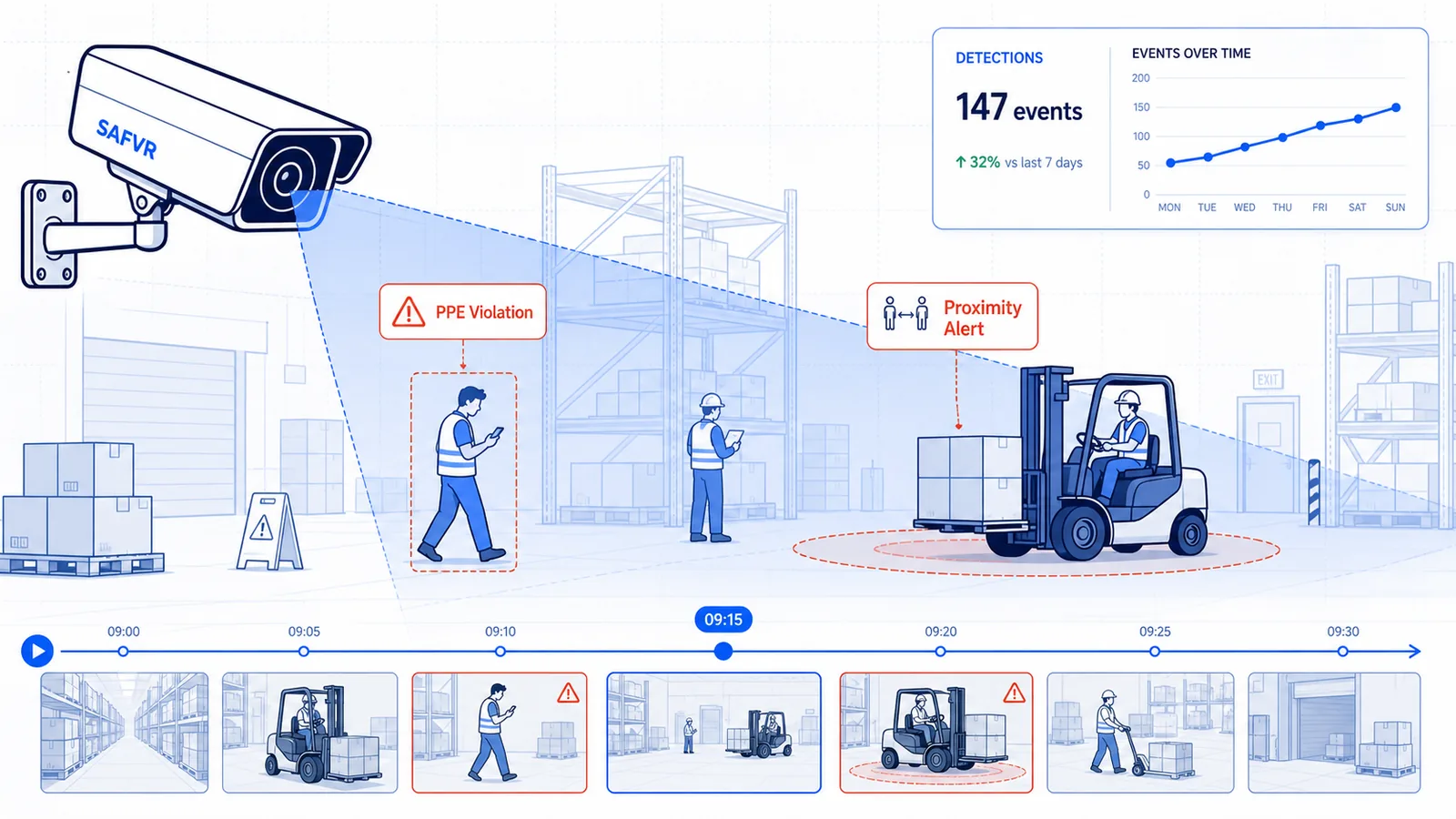
AI hazard detection uses computer vision to analyze live feeds from your existing IP cameras, identifying unsafe acts and conditions in real time without requiring new hardware. Most industrial facilities can deploy within 4–6 weeks using their current CCTV infrastructure, turning passive recording into Live Site Intelligence.
Every month, plant managers and EHS directors ask us the same question: "Do we need to rip out our cameras to use AI?"
The answer is no—and that single fact is reshaping how industrial operations approach safety.
Most facilities have already invested heavily in camera infrastructure. Hundreds of IP cameras cover production floors, warehouses, loading docks, and perimeter gates. Yet those cameras mostly record incidents rather than prevent them. Reviewing footage is reactive, manual, and impossible to scale across hundreds of feeds simultaneously.
The hesitation around new camera purchases is understandable. A mid-size manufacturing plant can have 200 to 400 cameras. Replacing even a fraction represents a six-figure capital outlay plus installation downtime. When EHS directors propose AI safety projects, the CFO's first question is often about hardware cost. Existing camera safety AI removes that objection entirely.
AI hazard detection software changes the equation. It transforms your existing camera network into an active safety layer—one that watches every feed, flags risks in real time, and routes alerts to the people who can act. And because it works with the cameras you already own, the barrier to entry drops from a capital project to a software deployment.
This guide explains exactly how computer vision safety monitoring works with existing cameras, what compatibility requirements actually matter, and what a typical rollout looks like from week one.
What Is AI Hazard Detection?
AI hazard detection is the application of computer vision and deep learning models to identify unsafe acts and conditions from live video streams. Rather than relying on human operators to monitor dozens or hundreds of camera feeds, the system processes video continuously, recognizes patterns associated with risk, and triggers alerts when those patterns appear.
Within a Safety Intelligence Platform, AI hazard detection functions as the perception layer. At SAFVR, this capability sits inside AURA (Autonomous Unified Recognition & Action) Engine — an adaptive safety intelligence platform — under the DETECT phase of our continuous loop: DETECT → ACT → IMPROVE → PREVENT.
AURA does not simply flag "something happened." It categorizes the event, assesses severity, and passes structured data to downstream workflows so safety teams can respond with context, not just curiosity.
Here are the nine core detection categories that most industrial deployments cover:
| Detection Category | What It Identifies | Typical Deployment Location |
|---|---|---|
| PPE Violations | Missing hard hats, safety glasses, gloves, high-vis vests, harnesses | Production floors, entry gates, elevated work zones |
| Slip, Trip, and Fall Risks | Liquid spills, obstructed walkways, uneven surfaces, cord hazards | Warehouses, corridors, packaging areas |
| Machine Guarding Gaps | Missing guards, interlock bypasses, unauthorized access to moving parts | Machine shops, CNC areas, press lines |
| Confined Space Entry | Unauthorized entry, missing permits, lone-worker violations | Tanks, silos, vaults, manholes |
| Forklift & Pedestrian Proximity | Near-misses, speeding, unauthorized pedestrian zones | Warehouses, loading docks, storage yards |
| Spills & Leaks | Chemical, oil, or water releases on floors or equipment | Processing areas, tank farms, maintenance bays |
| Ergonomic Risk Postures | Repetitive bending, overhead reaching, awkward lifting | Assembly lines, manual handling stations |
| Fire & Smoke Early Signs | Smoke plumes, flare-ups, abnormal heat signatures | Paint booths, chemical storage, server rooms |
| Unauthorized Zone Breach | Personnel entering restricted, high-voltage, or exclusion zones | Electrical rooms, chemical lockups, roof access |
Table: Nine detection categories covered by computer vision safety monitoring. Coverage mix varies by facility and is tailored during site calibration. Source: illustrative example based on typical industrial deployment patterns.
How AI Hazard Detection Works with Existing Cameras
The architecture is simpler than most IT leaders expect. Your cameras do not change. Nothing is bolted onto them. Instead, the video stream is routed to an processing layer that runs the AI models.
Here is the flow:
- Capture: Your existing IP cameras continue recording via RTSP or ONVIF streams exactly as they do today.
- Ingest: Streams are pulled into an edge gateway or secure cloud instance—your choice, depending on latency and data sovereignty requirements.
- Analyze: Computer vision models process each frame for the detection categories configured for that camera zone. Models are trained on industrial scenarios and then fine-tuned to your site's specific lighting, angles, and layouts.
- Decide: When a hazard is detected, AURA assigns a confidence score and severity level. Low-confidence detections are logged; high-confidence detections trigger alerts.
- Act: Alerts route through your chosen channels—SMS, email, Slack, or directly into your EHS workflow system. The AI hazard detection layer feeds automatically into the ACT phase, where permits, corrective actions, and notifications are issued.
The key enabler is that modern IP cameras already output digital video streams. The AI does not care about the camera's brand or age (within reason). It cares about resolution, frame rate, and network access. If your cameras feed into a VMS today, they can almost certainly feed an AI layer tomorrow.
Edge deployment is particularly attractive for IT teams with strict data governance policies. The edge gateway sits on your network, processes video locally, and only sends alert metadata—not full video streams—to the cloud. This means detection works even during internet outages, and sensitive footage never leaves your facility unless you choose to archive it centrally.
Site-specific tuning is what separates generic models from reliable ones. A model trained on warehouse lighting will struggle on a sunlit loading dock until it sees examples from your actual environment. That is why SAFVR calibrates models using footage from your facility—not generic open-source datasets.
Camera Compatibility: What You Need to Know
You do not need to standardize on a single camera brand. You do not need the latest 4K models. You do not even need cameras purchased in the last three years.
What you need is a short list of technical basics:
| Requirement | Minimum Spec | Recommended Spec | Why It Matters |
|---|---|---|---|
| Video Protocol | ONVIF or RTSP | ONVIF Profile S + RTSP | Ensures the AI layer can pull streams without proprietary adapters |
| Resolution | 720p (1280×720) | 1080p (1920×1080) | Higher resolution improves small-object detection (e.g., missing gloves) at distance |
| Frame Rate | 10 fps | 15–25 fps | Motion analysis needs enough frames to track movement accurately |
| Network | Wired Ethernet (PoE preferred) | Dedicated VLAN segment | Reduces bandwidth contention and simplifies security policy |
| Lighting | Fixed or semi-fixed illumination | Consistent LED or natural + supplemental | Extreme glare or darkness degrades detection accuracy |
| Camera Position | Static mount | Overhead or angled 15–45° downward | Steep angles or excessive motion blur reduce model confidence |
| Edge/Cloud Compute | Edge gateway with GPU or cloud VM | Hybrid: edge for latency, cloud for analytics | Edge keeps alerts local; cloud enables cross-site correlation |
Table: Brand-agnostic camera and infrastructure requirements for AI hazard detection software. Source: illustrative example based on typical integration architecture.
If your facility has a mix of camera ages and vendors, that is normal. Most deployments we see involve three to five different camera generations across a single site. The AI layer abstracts that complexity. You configure streams by URL, not by model number.
One caveat: analog CCTV systems (coaxial/BNC) require a video encoder to digitize the signal before AI processing. If you still run analog, factor in encoder costs—though many facilities undergoing this transition were already planning to move to IP anyway.
Ready to see if your camera network is AI-ready? Explore how AI hazard detection works within the full SAFVR platform, or start a 30-day safety intelligence pilot to test compatibility with your existing infrastructure.
9 Types of Hazards AI Can Detect
Not every facility needs every detection type. A food processing plant prioritizes PPE and slip hazards. A heavy manufacturing site may prioritize machine guarding and forklift proximity. The list below covers the full range, so you can map what matters to your operation.
1. PPE Violations Computer vision models trained on safety equipment can detect when a worker enters a zone without required gear. Hard hats, safety glasses, ear protection, gloves, high-visibility clothing, and fall harnesses are all distinguishable. PPE detection AI is often the first module deployed because it delivers immediate, visible wins at entry points and work zones.
2. Slip, Trip, and Fall Risks AI monitors for liquids, debris, cords, and packaging materials in walkways. Unlike human patrols, it checks every aisle, every second. Early deployments at warehousing facilities have shown this category catches hazards within seconds of occurrence—before the next worker rounds the corner. Source: anonymized deployment data.
3. Machine Guarding Gaps When a physical guard is removed or an interlock is bypassed, the visual signature changes. AI detects the absence of expected guarding around presses, lathes, and conveyor drives. This is especially valuable on third shifts when supervision is thinner.
4. Confined Space Entry Models can identify when a worker crosses a threshold into a tank, silo, or vault without the required permit conditions being met—such as a standby attendant present or gas monitor visible. This turns a paperwork control into a real-time verification layer.
5. Forklift & Pedestrian Proximity CCTV AI safety detection tracks forklift movement and pedestrian position simultaneously. It flags near-misses, speeding in pedestrian zones, and unauthorized foot traffic in vehicle aisles. Over time, this data builds a heat map of collision risk by shift and location.
6. Spills & Leaks Color and texture analysis identifies liquid accumulation on floors or dripping from equipment. Early detection limits slip exposure and can prevent cascading chemical incidents. The system differentiates between a permitted washdown and an unexpected release based on location rules.
7. Ergonomic Risk Postures Using skeletal pose estimation, AI flags repetitive bending, overhead reaching, and awkward lifting patterns. This does not replace ergonomic assessments, but it surfaces leading indicators of musculoskeletal strain at scale—something manual observation cannot replicate. Safety teams use this data to prioritize workstation redesign and targeted coaching rather than relying on annual assessments. Source: pilot benchmark data.
8. Fire & Smoke Early Signs Before flame is visible, smoke density and color changes are detectable. AI models trained on industrial fire signatures can alert safety teams minutes earlier than traditional smoke detectors in open bay environments, where ceiling-mounted sensors may delay activation.
9. Unauthorized Zone Breach Geofenced zones—electrical rooms, chemical storage, roof access—can be monitored without physical barriers. AI detects personnel crossing virtual boundaries and checks for required escorts or authorization badges visually. It augments card-access systems with visual verification.
Deployment Timeline: What to Expect
One of the biggest advantages of existing camera safety AI is speed. Because you are not running cable or mounting hardware, deployment focuses on software configuration, network policy, and model calibration.
| Week | Activity | Who Is Involved | Key Deliverable |
|---|---|---|---|
| Week 1 | Site assessment & camera audit | EHS, IT, Operations | Camera inventory, stream URL list, zone map |
| Week 2 | Network setup & edge/cloud provisioning | IT / Security | Secure stream ingestion, VLAN rules, firewall config |
| Week 3 | Model calibration & site-specific tuning | SAFVR deployment team, site safety lead | Fine-tuned detection models for your lighting and angles |
| Week 4 | Alert workflow configuration | EHS, shift supervisors | Routing rules, severity thresholds, notification channels |
| Week 5–6 | Pilot testing & refinement | All stakeholders | Validated detection accuracy, tuned false positive rates |
| Week 7+ | Full rollout & continuous optimization | Site teams, SAFVR support | Production coverage, monthly model refresh, incident review |
Table: Typical 6-week deployment timeline for computer vision safety monitoring with existing cameras. Source: illustrative example based on standard integration methodology.
Most sites achieve meaningful coverage within four weeks. The two-week pilot buffer (Weeks 5–6) is where the magic happens. Models encounter your site's real edge cases—unusual glare from a west-facing window, a temporary scaffold blocking a camera, a new reflective floor finish—and adjust. Expect detection accuracy to climb steadily during this window as false positives are filtered out.
Privacy, Compliance, and Data Security
IT and security leaders rightfully ask: What happens to our video? Who sees it? Where does it live?
Here is how responsible existing camera safety AI addresses those concerns.
Data residency and architecture: You choose where processing happens. Edge deployment keeps video on-premise and only sends metadata and alerts to the cloud. Full cloud deployment uses encrypted transmission and region-locked storage. Many facilities opt for a hybrid: edge for real-time detection, cloud for cross-site analytics and reporting.
Worker transparency: We recommend informing your workforce that AI is being deployed for hazard detection, not performance surveillance. Transparent communication builds trust and supports adoption. Several SAFVR customers have found that involving safety committees in the deployment planning process accelerates acceptance and surfaces practical concerns early. Source: customer-reported outcomes.
Encryption: Streams are encrypted in transit (TLS 1.3) and at rest (AES-256). Access to video archives and detection logs is role-based and audit-logged.
Privacy by design: AURA is configured to detect hazards and conditions, not to track individuals. Facial recognition is not used. Worker identities are typically anonymized unless explicitly required for incident investigation. This distinction matters to both union relations and regulatory posture.
Compliance posture: SAFVR is designed to support compliance frameworks including OSHA recordkeeping, ISO 45001 management systems, and regional privacy regulations. Video retention periods are configurable to match your policy—whether that is 30 days or seven years. Source: designed to support; consult your legal team for jurisdiction-specific requirements.
SOC 2 and enterprise security: The platform operates within enterprise security environments and integrates with SSO and Active Directory. Annual third-party penetration testing and vulnerability management are standard practice.
Common Myths About AI Safety Cameras
Misinformation slows adoption. Let us address the myths we hear most often from plant leadership and IT teams.
| Myth | Reality |
|---|---|
| "We need 4K cameras and perfect lighting." | 720p or 1080p cameras are sufficient for most detection tasks. Models adapt to varying light conditions through site-specific calibration. Extreme darkness can be addressed with inexpensive IR illuminators. |
| "AI will replace our safety officers." | AI augments safety teams, it does not eliminate them. It handles the impossible task of watching every feed simultaneously, so officers can focus on investigation, coaching, and root-cause analysis. |
| "False positives make it unusable." | Initial false positives are normal—and manageable. During the 2-week calibration window, models learn the difference between a real hazard and a shadow. Most sites reach a <5% false positive rate on critical alerts within the first month. Source: pilot benchmark data. |
| "This is just surveillance dressed up as safety." | The system is trained on hazard patterns, not worker identity or behavior scoring. The goal is to catch missing guards and spills, not to write up individuals for taking a long lunch. |
| "Deployment will shut down production for weeks." | Software deployment requires no physical changes to cameras or lines. Network configuration happens during maintenance windows. Most sites experience zero operational downtime. |
Frequently Asked Questions
Will AI hazard detection work with our old cameras? If your cameras output an IP stream (RTSP or ONVIF) and record at 720p or higher, they likely work. Cameras from the last 8–10 years commonly meet this threshold. Analog systems need an encoder but are still compatible.
How does the system handle false positives? False positives are highest in the first few days and drop sharply during calibration. Site-specific tuning teaches the model your environment's normal state. You also set confidence thresholds and escalation rules so low-confidence detections are logged but not alerted.
Is our video data secure? Yes. Streams are encrypted in transit and at rest. Edge deployment keeps raw video on-premise. Access is role-based, audit-logged, and integrates with your identity provider. No video is used to train models outside your account without explicit consent.
Do we need to hire AI specialists to manage this? No. The platform is managed by SAFVR's deployment and customer success teams. Your IT team handles network access and stream URLs—tasks they already perform for your VMS. Day-to-day operation is designed for safety professionals, not data scientists.
What is the typical ROI timeline? Most pilot participants identify multiple preventable risk events in the first 30 days. Full ROI depends on your incident cost baseline, but reduced incident frequency, lower manual audit hours, and improved underwriting posture typically show quantifiable value within one to two quarters. Source: customer-reported outcomes.
Conclusion
AI hazard detection is no longer a futuristic concept requiring million-dollar infrastructure overhauls. It is a software layer that sits on top of the cameras you already own, turning passive video into Site-Specific Safety Intelligence.
For plant managers worried about capital expense, the message is clear: no rip-and-replace. For IT leaders, the message is equally clear: standard protocols, encrypted streams, and flexible deployment options. And for EHS directors, the payoff is Live Site Intelligence that catches hazards in seconds—not during tomorrow's incident review.
The facilities gaining the strongest safety advantage in 2026 are not the ones with the newest hardware. They are the ones that decided to make their existing hardware intelligent.
If you are evaluating computer vision safety monitoring for the first time, the best next step is not a Request for Proposal—it is a proof of concept on your own cameras. You will learn more in two weeks of live detection than in six months of vendor presentations.
Start your 30-day safety intelligence pilot and see what your cameras have been missing. No new hardware required.
Related Reading
- PPE Detection AI: The Complete Guide — A deep dive into hard hat, vest, and glove compliance monitoring — one of the most impactful hazard detection categories.
- Predictive Safety Analytics Guide — What happens after detection: how AI turns hazard data into predictive risk models.
- What Is a Safety Intelligence Platform? — Understand how hazard detection fits into the broader safety intelligence ecosystem.